

What Front End Programming Does
Front end programming builds the part of a website people see and use in their browser. HTML structures the content, CSS controls its look and layout, and JavaScript adds interactions. The back end handles work such as storing data and processing requests on a server.
For a business, the front end shapes how easily customers can read a page, use it on a phone, and complete a form. This guide explains the core skills, tools, and goals behind that experience.
I’m Lindsey Huettner, owner of The it Crowd, where I lead marketing projects that include web development, branding, and SEO. My experience connecting front end programming to business goals informs this guide, starting with how the browser and server work together.
Front-End vs. Back-End vs. Full-Stack Development
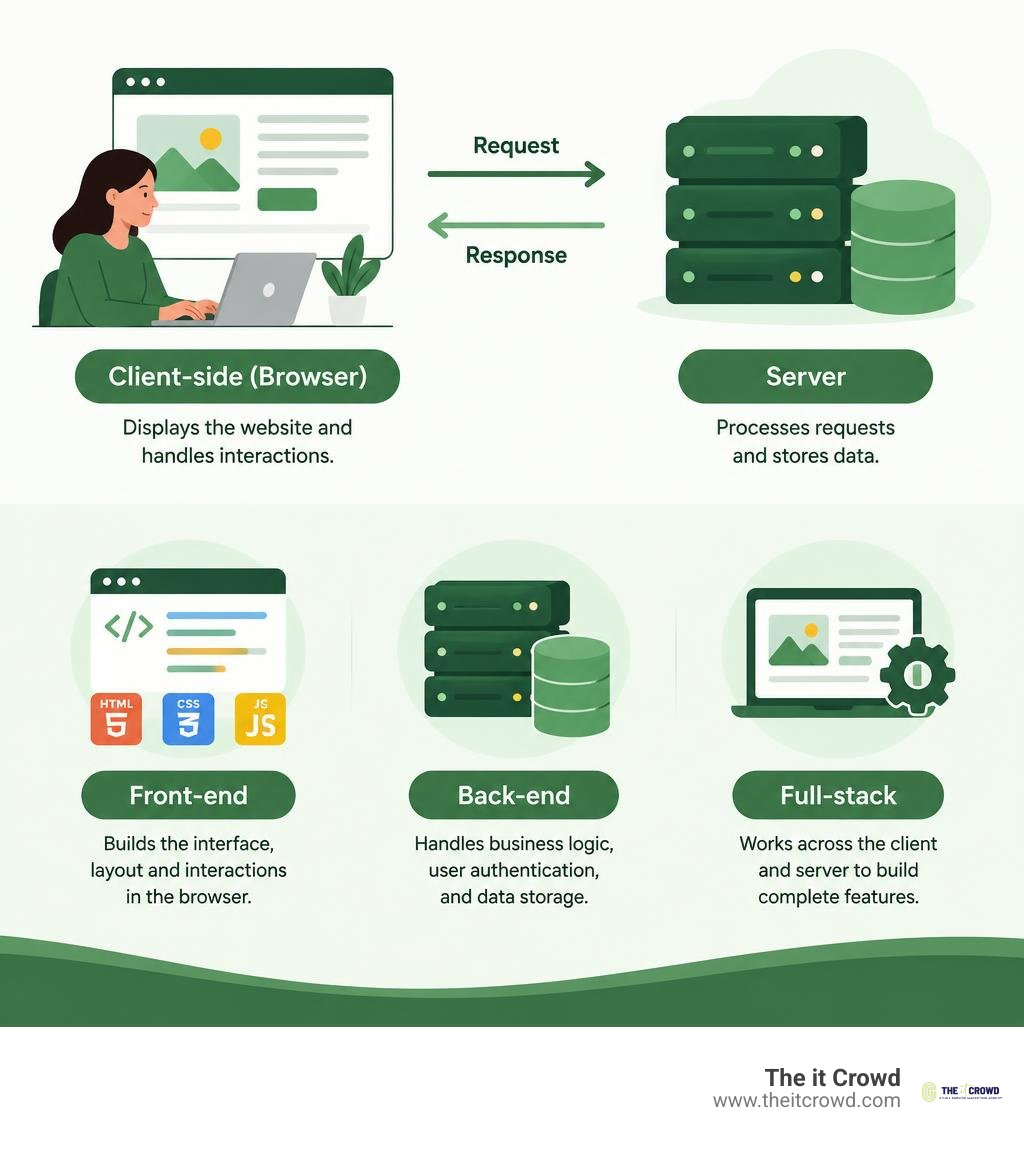
To understand modern application architecture, we first need to look at how distinct roles collaborate to deliver a polished digital product. Building a website involves a division of labor between client software (what executes in your browser) and server architecture (what runs in a remote data center).
Front-end developers focus purely on client-side code, crafting accessible layouts, smooth navigation menus, and reactive interfaces. Back-end developers engineer server-side logic, configure databases, manage user authentication, and orchestrate HTTP communication. Full-stack developers straddle both domains, managing end-to-end features from database queries all the way to user interface styling.
| Role | Primary Focus | Core Technologies | Execution Environment |
|---|---|---|---|
| Front-End Developer | User interface, client-side interactivity, responsive design | HTML, CSS, JavaScript, React, Vue | Web Browser (Client) |
| Back-End Developer | Business logic, database management, server APIs | Node.js, Python, PHP, Java, SQL | Remote Server / Cloud |
| Full-Stack Developer | End-to-end integration across client and server | Front-end stack + Back-end stack + DevOps | Client and Server |
At The it Crowd, our approach to comprehensive web design and development treats client-side usability and server-side reliability as equal partners. A sleek visual design falls flat if server responses lag, and a lightning-fast server goes unnoticed if the interface feels confusing or clunky.
Client-Side Architecture and the Browser Engine
When a browser retrieves an address, it initiates a complex rendering pipeline to translate raw text files into visual elements. Understanding this pipeline helps front-end engineers write performant code that keeps interactions smooth.
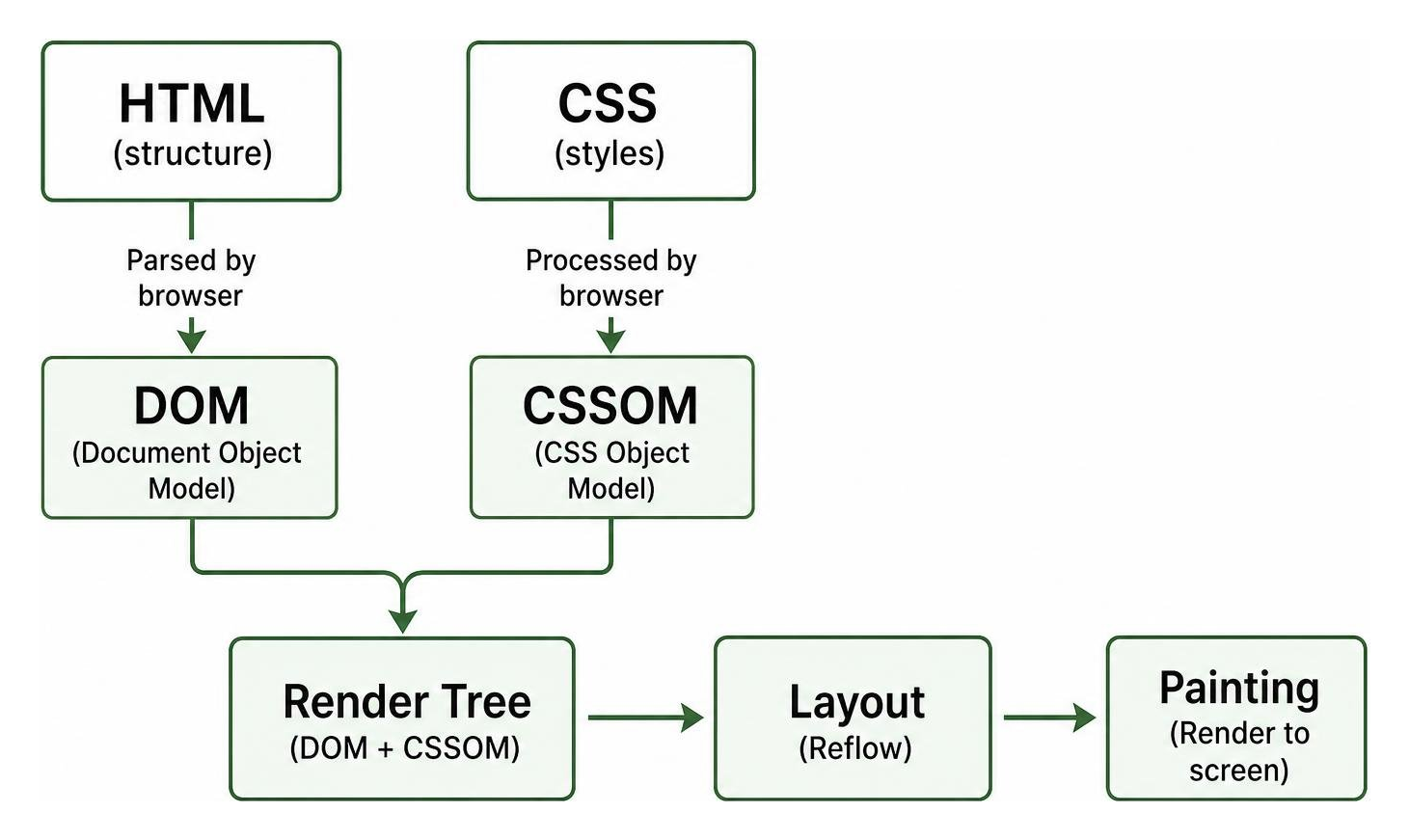
- DOM Tree Construction: The browser engine parses incoming HTML bytes, converts them into tokens, and builds the Document Object Model (DOM), representing the page’s hierarchical content.
- CSSOM Construction: Simultaneously, the browser processes CSS rules to construct the Cascading Style Sheets Object Model (CSSOM), mapping out styling rules for every node.
- Render Tree Generation: The engine combines the DOM and CSSOM into a render tree, discarding hidden elements like
or anything styled withdisplay: none. - Layout (Reflow): The browser calculates exact coordinates and dimensions for every visible element relative to the device viewport.
- Painting: The engine rasterizes pixels onto the screen, rendering text, colors, images, borders, and shadows.
Throughout this lifecycle, the JavaScript event loop manages user inputs, animations, and network requests, while client-side caching ensures static assets load instantly on repeat visits.
Server-Side Data Flow and API Communication
The front end rarely exists in isolation; it depends on structured data exchanges with the back end. Client applications fetch information dynamically using standard protocols like RESTful APIs or modern GraphQL queries.
When a user submits a contact form or filters a product catalog, JavaScript packages the data into structured JSON payloads and dispatches an asynchronous HTTP request. Cloud infrastructure and serverless functions process this payload, execute database queries, and return an HTTP status code alongside updated data. Mastering these communication channels represents a fundamental milestone in Web Development fundamentals.
The Core Pillars of Front End Programming: HTML, CSS, and JavaScript
Every web application relies on three foundational technologies working in tandem. If we imagine a webpage as a building, HTML provides the physical foundation and walls, CSS handles the architectural aesthetics and paint, and JavaScript installs the electrical wiring, plumbing, and automation systems.
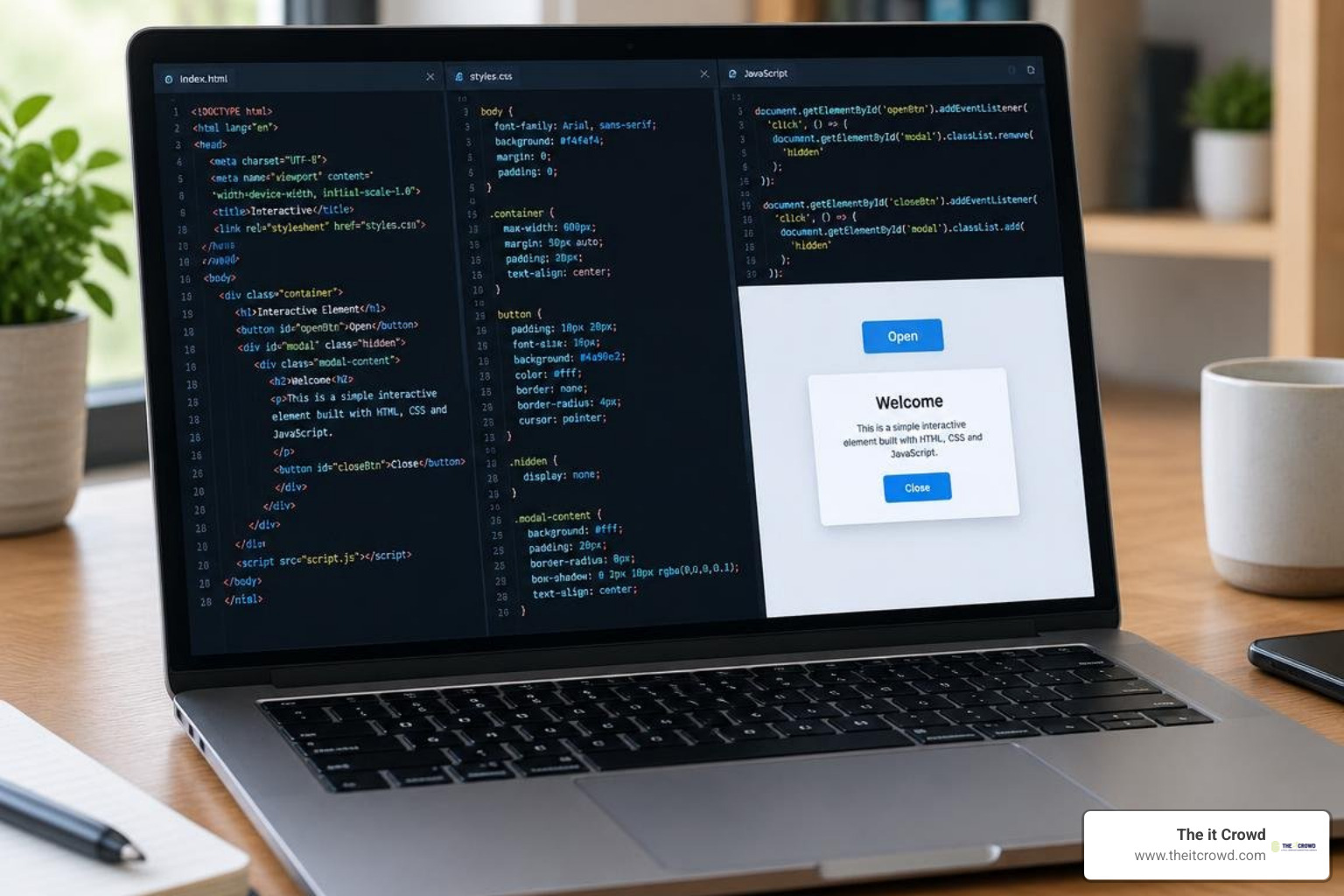
Adhering to progressive enhancement ensures that core content remains available on basic devices, while richer styling and dynamic scripts elevate the user experience on capable browsers.
HyperText Markup Language (HTML5) and Document Structure
HTML5 establishes the structural foundation of every page. Rather than relying on generic wrapper tags, professional front-end programming emphasizes semantic elements such as , , , , and .
Semantic elements provide critical context to assistive technologies by constructing a clean accessibility tree for screen readers. Furthermore, proper document outlines, semantic form controls (like ), and structured metadata directly reinforce search engine visibility and indexation.
Cascading Style Sheets (CSS3) and Responsive Styling
CSS3 transforms plain HTML documents into visually engaging digital products. Modern styling relies heavily on two layout engines:
- CSS Flexbox: A one-dimensional layout model designed for distributing space and aligning items along a single axis (row or column). It excels at navigation bars, button groups, and centered hero components.
- CSS Grid: A powerful two-dimensional layout system that manages rows and columns simultaneously, ideal for full-page scaffolding, image galleries, and data dashboards.
By combining these layout models with media queries and mobile-first workflows, developers build fluid interfaces that reconfigure gracefully across smartphones, tablets, laptops, and ultra-wide displays. Preprocessors like Sass and modern CSS variables streamline design systems, keeping typography, spacing tokens, and color palettes maintainable across thousands of lines of code.
JavaScript (ES6+) and Dynamic DOM Manipulation
JavaScript delivers the logic, real-time interactivity, and state management that transform static documents into responsive web applications. Modern ECMAScript (ES6+) introduced substantial upgrades, including arrow functions, destructuring, classes, modules, and template literals.
Key capabilities in modern client-side scripting include:
- Asynchronous Programming: Handling network latency smoothly using Promises and
async/awaitsyntax. - Event Handling: Listening for click, scroll, keyboard, and touch events to trigger instant UI updates.
- Data Fetching: Using the native Fetch API to retrieve live information without requiring a full page refresh.
- WebAssembly (Wasm): Compiling languages like Rust, C, or C++ to run at near-native execution speeds directly inside modern browser engines for resource-intensive tasks like video rendering or physics simulations.
Modern Frameworks, Libraries, and Developer Tooling
As web applications grew in scale and complexity, direct manipulation of the DOM became difficult to maintain. Today’s development ecosystem relies on specialized component-based frameworks and automated build tooling, allowing engineering teams to implement 8 front-end languages and tools to learn and execute comprehensive website optimization strategies.
UI Frameworks and Libraries: React, Vue, and Bootstrap
Modern front-end engineering favors declarative, component-driven design. Instead of building monolithic HTML pages, developers create self-contained, reusable components that encapsulate markup, styling, and business logic.
- React: Maintained by Meta, React uses a Virtual DOM to optimize rendering performance, updating only the specific nodes that change when application state shifts.
- Vue.js: Known for its gentle learning curve and progressive adoption, Vue provides an approachable template syntax alongside powerful reactive state management.
- Bootstrap: A widely adopted CSS framework featuring a responsive 12-column grid and pre-built interface components. Notably, around 15% of the top 100,000 most visited websites still leverage Bootstrap for rapid interface scaffolding.
Build Tools, Package Managers, and Version Control
Modern front-end engineering relies on structured development pipelines to bundle, optimize, and deploy assets:
- Build Tools and Bundlers: Tools like Vite and Webpack compile modern JavaScript, transpile Sass into CSS, compress images, and execute tree-shaking to eliminate unused code.
- Package Managers: Ecosystem managers such as
npmandyarnhandle thousands of open-source libraries and external dependencies. - Version Control: Git tracks code revisions, facilitates branch-based collaboration, and prevents merge conflicts across distributed engineering teams.
- CI/CD Pipelines: Automated continuous integration and deployment workflows run automated test suites and deploy verified code directly to cloud hosts.
Essential Goals: Performance, Accessibility, and Cross-Browser Compatibility
Effective front-end programming is measured not just by how an interface looks, but by how reliably, quickly, and equitably it performs for every visitor.

Balancing fast rendering with inclusive design is central to technical SEO and site optimization, ensuring that both search crawlers and everyday visitors enjoy frictionless navigation.
Responsive Design and Cross-Browser Compatibility
A robust web application must deliver a consistent experience across Chrome, Safari, Firefox, Edge, and diverse mobile operating systems. Achieving cross-browser resilience requires:
- Fluid Layouts: Setting relative units like percentages,
rem, and viewport widths (vw/vh) rather than fixed pixel dimensions. - Viewport Meta Tags: Configuring
to ensure mobile devices scale pages accurately. - Browser Engine Testing: Validating layouts across Blink (Chrome/Edge), WebKit (Safari), and Gecko (Firefox) rendering engines.
- DevTools Debugging: Using browser developer consoles to inspect CSS rules, profile JavaScript memory usage, and throttle network speeds during stress testing.
Front End Programming Standards for Web Accessibility (a11y) and Performance
Web accessibility ensures digital products remain usable for people with visual, auditory, motor, or cognitive disabilities. Aligning with the Web Content Accessibility Guidelines (WCAG 2.1) involves integrating semantic landmark elements, ensuring sufficient color contrast ratios, managing keyboard focus traps, and implementing descriptive Accessible Rich Internet Applications (ARIA) attributes.
Performance tuning directly supports accessibility. Developers optimize Core Web Vitals (such as Largest Contentful Paint and Cumulative Layout Shift) by applying code splitting, minifying CSS/JS bundles, lazy-loading offscreen images, and prioritizing critical rendering paths.
Career Pathways, Salaries, and Industry Outlook
The demand for talented front-end developers remains exceptionally high across digital agencies, startups, enterprise corporations, and remote teams. According to Statista, recruiters consistently rank front-end development as one of the top four most in-demand IT roles globally.
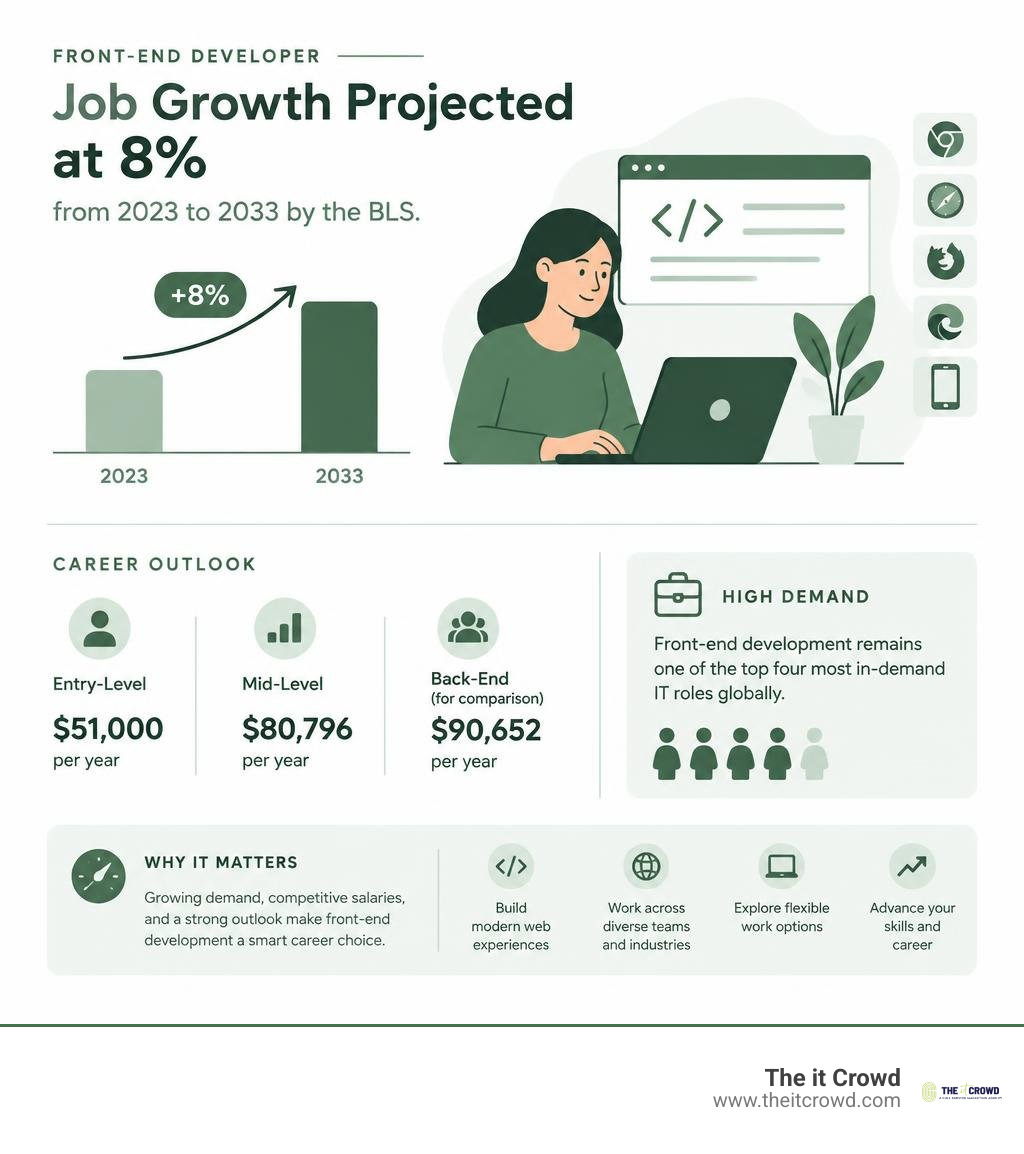
According to the U.S. Bureau of Labor Statistics (BLS), web development roles are projected to grow by 8 percent from 2023 to 2033, outpacing the average for all occupations.
Compensation across the industry reflects this steady demand:
- Entry-Level Positions: Starting salaries for junior developers typically average around $51,000 per year.
- Mid-Level Front-End Roles: PayScale benchmark data reports average front-end compensation at $80,796 annually (compared to $90,652 for back-end roles and $81,902 for full-stack developers).
- Senior & Total Compensation: Glassdoor reports an average yearly total compensation of $117,000 for front-end developers in the United States when factoring in base pay, bonuses, and incentives.
For deeper industry context on daily responsibilities and specialization paths, review insights from CareerExplorer on front-end roles.
Technical and Soft Skills for Front End Programming Success
Thriving in client-side engineering requires a blend of analytical thinking and interpersonal collaboration:
- Technical Acumen: Deep fluency in core web standards, component lifecycles, REST/GraphQL endpoints, state debugging, and version control workflows.
- UI/UX Empathy: An appreciation for visual hierarchy, micro-interactions, responsive typography, and user behavior patterns.
- Algorithmic Problem-Solving: Translating complex business requirements into performant, clean, and maintainable code.
- Cross-Functional Communication: Collaborating effectively with UI designers, project managers, back-end engineers, and stakeholders.
At The it Crowd, our proprietary AI infrastructure (“The Hive”) works in tandem with our engineers to accelerate prototyping and code analysis. Embracing AI-ready web infrastructure allows developers to automate boilerplate development and focus on higher-level system architecture and user delight.
Educational Paths, Bootcamps, and Certifications
There is no single path into front-end development. Aspiring engineers enter the field through several avenues:
- Computer Science Degrees: Provide rigorous foundations in data structures, algorithms, and software engineering principles.
- Self-Directed Roadmaps: Leveraging online documentation, interactive tutorials, and building practical cloning projects.
- Professional Certifications: Structured curricula such as the IBM Front-End Developer Professional Certificate provide guided instruction across Git, React, and cloud-native concepts.
- Portfolio Development: Building real-world applications, participating in open-source repositories on GitHub, and deploying live single-page applications show employers practical competence better than a resume alone.
Frequently Asked Questions About Front End Development
Is front end programming hard to learn for beginners?
Front end programming is widely considered one of the most accessible entry points into software engineering because of its immediate visual feedback loop. When you modify an HTML tag or adjust a CSS color property, you see the result instantly in your browser window.
While learning foundational HTML and CSS syntax is straightforward, mastering advanced JavaScript, state management, asynchronous data flows, and performance optimization requires dedicated study and regular practice.
What is the difference between a UI/UX designer and a front-end developer?
A UI/UX designer focuses on user research, interaction flows, wireframing, color theory, and visual prototypes using design software like Figma or Adobe XD. They define how an application should look, feel, and behave from a human-centered perspective.
A front-end developer takes those design mockups and writes production-ready code (HTML, CSS, JavaScript) to make the interface functional, interactive, accessible, and connected to live APIs. Aligning both skill sets is critical for comprehensive digital web presence strategies.
What programming languages are used besides JavaScript in front-end development?
While JavaScript remains the standard language natively interpreted by web browsers, developers frequently utilize other languages that compile or transpile down to client-executable code:
- TypeScript: A statically typed superset of JavaScript that catches type errors during compilation, improving stability across large codebases.
- WebAssembly (Wasm): A binary instruction format allowing low-level languages like Rust, C, and C++ to execute inside browsers at near-native speeds.
- Dart: Used primarily alongside the Flutter framework to compile cross-platform mobile and web interfaces from a single codebase.
Conclusion
Front end programming sits at the intersection of aesthetic design and robust technical engineering. As web technologies continue to advance—from progressive web apps to AI-assisted coding and WebAssembly—the demand for performant, accessible, and intuitive client-side applications will only grow.
Building an exceptional digital presence requires balancing visual appeal with technical precision. Whether you are modernizing an enterprise application, refining an e-commerce platform, or launching a new venture, our team at The it Crowd provides scalable digital solutions and web development services designed to elevate your brand and drive measurable growth.

